I've been explaining the same architectural decision to my AI agent four times per week. The same decision, four sessions, from scratch every time. Each new session the agent walks in fresh, the chat window where we settled it last time is closed, and the rationale that justified the choice lives only in my head, where it helps nobody including future-me.
AI agents have a memory problem. They do excellent work in the moment and lose the plot the next session, since whatever context you painstakingly built has expired. By day thirty of any project, half the decisions trace back to chat windows you've closed, and the other half live in your head, or your own notes. The agent that picks the project up tomorrow - technically, the same model, but practically a complete stranger.
The fix is boring: write everything down. The catch is that most ticketing systems are too heavy to maintain alongside the actual work, so people stop, and the fix stops working. The trick is to make the ticketing light enough that the agent will actually keep doing it, and structured enough that the next agent who reads it can pick up where the last one left off.
So I built a thing.
Essentially it's a simplified Jira/Trello/whatever-kanban-thing-comes-to-mind, but build in a way that AI agent can actually use it, locally. And human could just observe what's going on and steer when needed. Corporate idea of pain, but without corporate and pain, hah.
The Protocol Is a Folder
ai-agent-workflow is three directories: backlog/, inbox/, done/ . There's also a SKILL.md that tells any agent how to use them. Each ticket is a markdown file. The folder it sits in is its status. Move the file, the status changes. Grep the folder, you see the truth. Delete the GUI app and your project keeps working.
Every ticket follows the same shape:
# B3. fix preview crash on large PDFs
## Metadata- Status: INBOX- Severity: HIGH- Scope: Desktop app- Assignee: Claude
## Problem{1–3 sentences. What is wrong, with evidence.}
## Required Changes{Step-by-step. File paths, signatures, code snippets if needed.}
## Acceptance Criteria{Bulleted, verifiable.}
## Notes{Optional. Gotchas, dependencies, what to skip.}
This is not just fancy dashboard thingy. The structure is what does the work, in both directions. Going in: the agent has to think before it writes anything, because the moment it has to draft Acceptance Criteria for "fix the auth thing". It can no longer guess on the fly; it has to commit to a position in writing. Coming back out: when the same agent or a different one tomorrow - picks up that ticket, the Problem is stated, the Required Changes are listed, the Acceptance Criteria are spelled out. Far less room for creative reinterpretation than "remember the auth thing we were cooking 2 days ago".
The whole ticket is, functionally, a letter from one agent to the next. It just happens to look like a project management artefact.
That is the whole product. The skill is a ~300-line markdown file. The tickets are markdown files. The board is a folder.
So Why Build a GUI
Because after reading a folder full of forty tickets you go blind. You could use Zed /VS Code or some markdown viewer, and I did it like that at first, but it still was quite clunky...
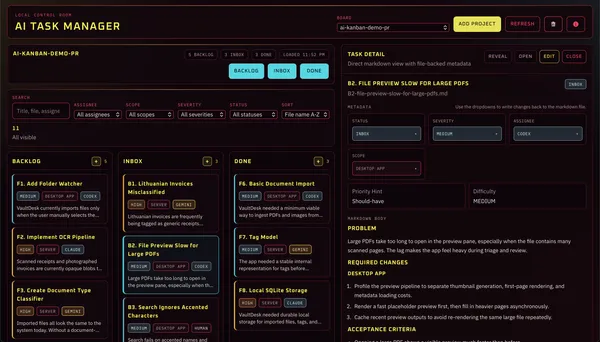
As you can see, the design is very cyberpunk 👾
But anyway;
AI Task Manager is a Tauri desktop app (Svelte frontend, Rust backend, ~11MB binary) that points at a project root folder and gives you a board over its ai-agent-workflow/. Three columns, cards, a detail pane, filters by assignee/scope/severity/status. Drag a ticket from inbox/ to done/ and the file actually moves on disk; the metadata flips; the next agent run sees the change.
It is, deliberately, a view layer. The filesystem is the database; the app's whole job is to render what's already there. If I meet the bus face-to-face tomorrow, your tickets are still sitting in their folders, exactly the way the last agent left them. You can keep working from vim. That is a feature.
Where the GUI is just a tailored command center. When I've handed the inbox to a scheduled agent and I want to glance at what it did overnight, the board is faster than ls done/ | sort -r | head. Same data, less filtering. Both work though.
Autonomous Loops, or: How Agents Work While I Sleep
The split between inbox/ and backlog/ looks small on the README but it is the entire reason this works for AI agent workflows. A regular kanban board would not survive a cron job.
inbox/ is authorised work: the hooman meatbag has signalled these are ready to execute. backlog/ is the queue: real, worth doing or maybe not - not green-lit yet. A scheduled agent (a cron job, a Codex Automation, a git push-triggered CI worker, an @autonomous skill... pick your flavour) can safely go through inbox/ without surprising anyone (you), because every ticket in inbox/ is already a fully written briefing. It works the tickets, writes verification notes, flips Status to DONE, moves the file. backlog/ stays untouched until I personally promote something into the queue or tell agent to specifically do something about the backlog.
So the loop for AI agent is small, not an overhyped miracle department worker:
- Read
ai-agent-workflow/inbox/. - Pick the highest-severity ticket assigned to it.
- Do the work the ticket already specifies.
- Append verification notes, set Status to DONE, move to
done/. - Sleep.
Run that on a schedule and your project moves while you don't. Open the desktop app the next morning, see what happened, redirect with the Assignee field if you want, promote a few items from backlog/ to inbox/, go back to washing dishes.
The skill ships with one hard rule: anything needing credentials, secrets, or production deploy access auto-routes to Assignee: Human. Agents do not hold my keys. You, ofc, can tweak it to do otherwise, if you know what you're doing.
Living Documentation, Where Memory Actually Lives
Tickets describe changes. They are useless for understanding what is currently true. So the skill also scaffolds a documentation/ folder when a project warrants it — CURRENT_STATE.md, ARCHITECTURE.md, SECURITY.md, DEPLOYMENT.md, DEVELOPMENT_GUIDE.md, ROADMAP.md. Point-in-time artefacts (a security audit, a performance baseline) go in documentation/archive/ with a date in the filename and never get edited again. Yes, tokens, but those vastly improves the quality of project I'm doing. Because, once again, it forces agent to "bear in mind" that there's more to the project than just baking new features like there's no tomorrow.
The rule the skill enforces: when a ticket changes current state, like a schema migration, a new env var, a flipped architectural decision and so on - the relevant doc updates in the same change, before the ticket moves to done/. Otherwise the docs drift, stop being trustworthy, and you might as well not have them.
I read CURRENT_STATE.md whenever I come back to a project after a week off. The agent reads it whenever needed. Same file, both audiences, both have amnesia 🤡. Worth it.
Not Jira, And That's the Point
Everything above only works because the system stops below the threshold where the ticketing itself starts to feel like a job. There are no priorities to compute, no story points, no scrum master, no swim lanes, no sprints, no approvals, no fields-you-forgot-to-fill-in that block the save. It's simple. It's markdown files in a folder. The agent writes it. The agent updates it. The agent moves it when the work is done. If the file is good, the next agent can read it and act on it. If the file is bad - you annoy the agent and the agent rewrites it. That is the whole loop.
The reason heavyweight ticketing systems fail in agent workflows is not capability , but friction. An agent will not log a finding if logging a finding takes seven clicks and a dropdown menu, and a human will not log it either, which is how every ticketing project I have ever joined ends up with three real tickets and a mystery backlog. An agent will, however, write a structured markdown file all day, because writing structured markdown files is what agents do anyway. The job becomes documentation by default, which is the only kind of documentation that actually survives.
Try It
-> GitLab source.
-> GitLab Webpage.
MIT with an attribution addendum. macOS desktop release is up. Linux and Windows build from source until I find will to package them. Drop the SKILL.md into any project/agnet and hand the agent one sentence: "set up the ai-agent-workflow." The whole structure scaffolds itself.
If you've also been explaining the same thing to your agent twice, this might help. If not - deleting one folder is not that hard.